
Wake
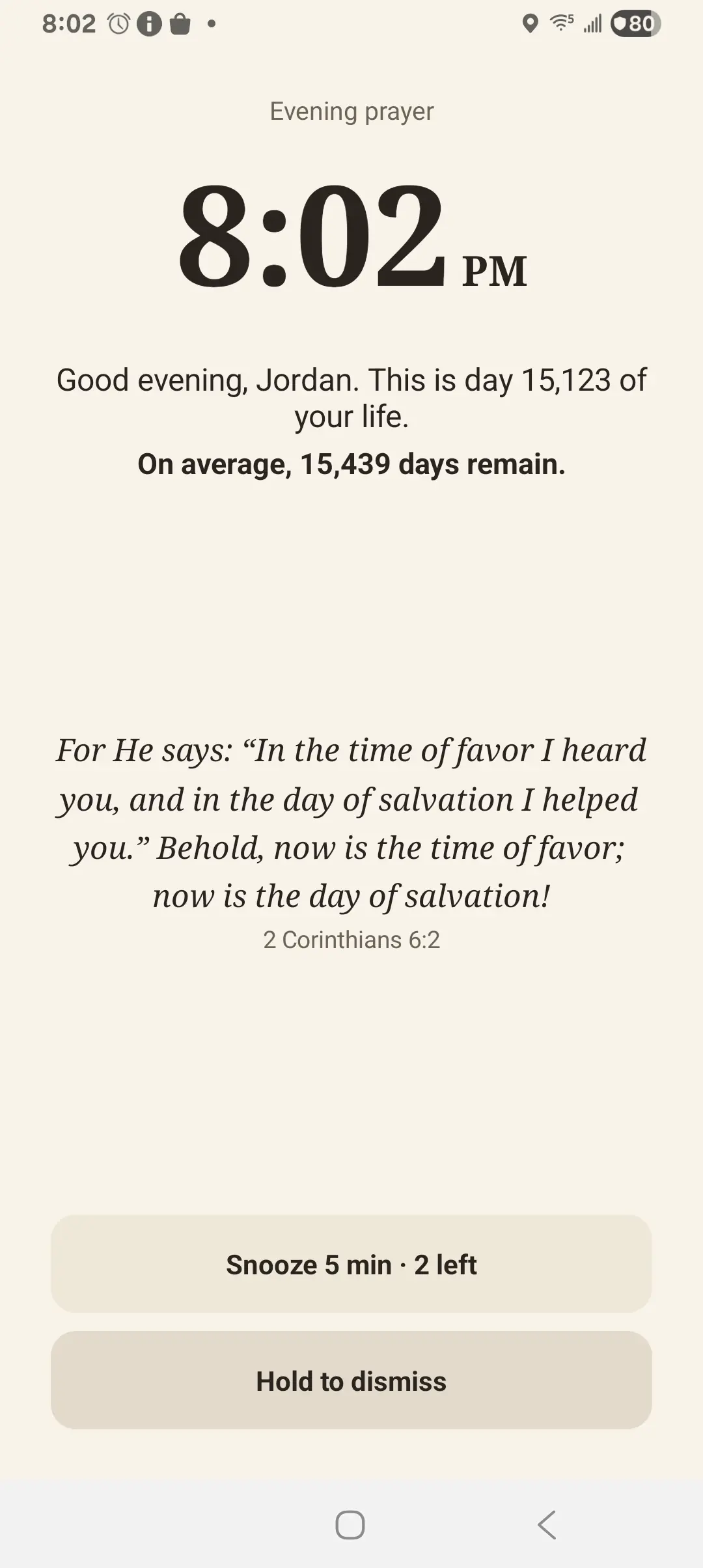
Every alarm opens to your day count and a verse. Snooze and Dismiss stay at the bottom of the screen.
Kingdom Tools · Android and iPhone
Redeem the Time brings a little perspective to your day—and a simple way to begin the next part of it.
Keep your days and Scripture in view. Wake with purpose. Start a focus with one tap; on Android it rests the apps that pull at you and answers your texts until you're done.
Why the name
Most of us don't lose our lives all at once. We lose them a few minutes at a time: one more scroll, one more notification, one more thing that felt urgent and wasn't.
Scripture calls us to redeem the time, to buy it back on purpose for what matters most: God, the people we love, and the work He has given us to do. Psalm 90 asks God to teach us to number our days so that we gain a heart of wisdom.
Redeem the Time is built around that prayer. Days shows you the time you've been given in a way that's hard to ignore. Wake starts the morning with that number in view. Focus clears the noise, so the next few minutes go to what you chose instead of whatever is loudest.
“So teach us to number our days, that we may apply our hearts unto wisdom.” — Psalm 90:12, KJV
Start with Days · Always free
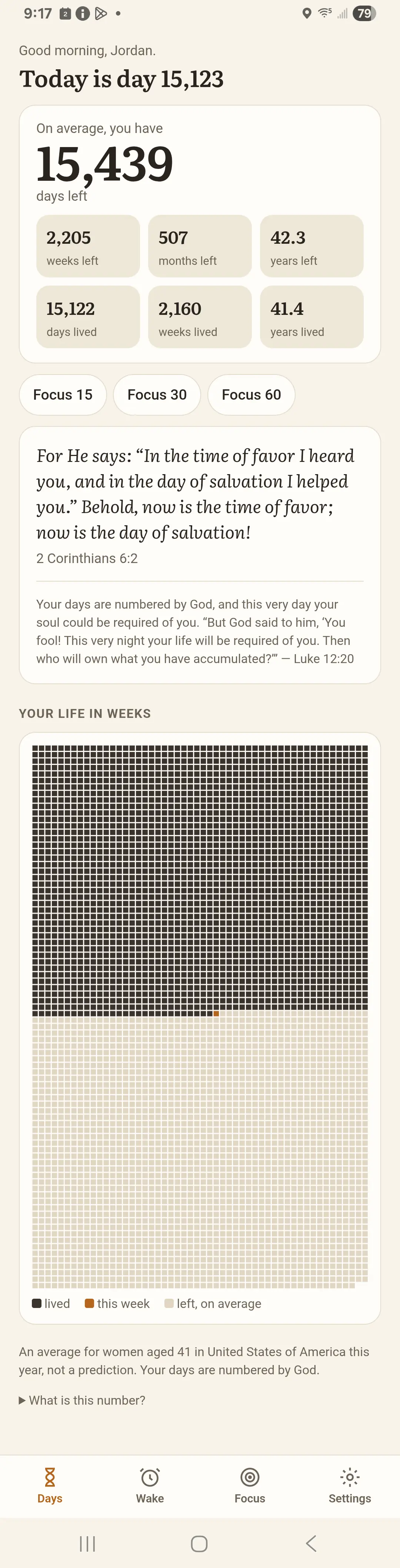
See the days you have lived and a lifetime-range view based on population averages. Look at your life in weeks, or pause with a passage of Scripture about making your time count.
The numbers are estimates, not a prediction of your lifespan. They use life-table averages for your age and selected country, with optional sex information. They cannot tell you how long you personally will live.
The whole Days screen, top to bottom: today's day number, the days, weeks, months and years behind you and the average ahead, a passage of Scripture, then your life in weeks, one square for every week, the weeks lived filled in.
“Redeeming the time, because the days are evil.” — Ephesians 5:16, KJV
Inside the app
1:13 · Recorded on Android
Set up once, see your days, set a morning alarm and start a focus. This silent tour has English captions. The example profile is fictional.
Every alarm opens to your day count and a verse. Snooze and Dismiss stay at the bottom of the screen.
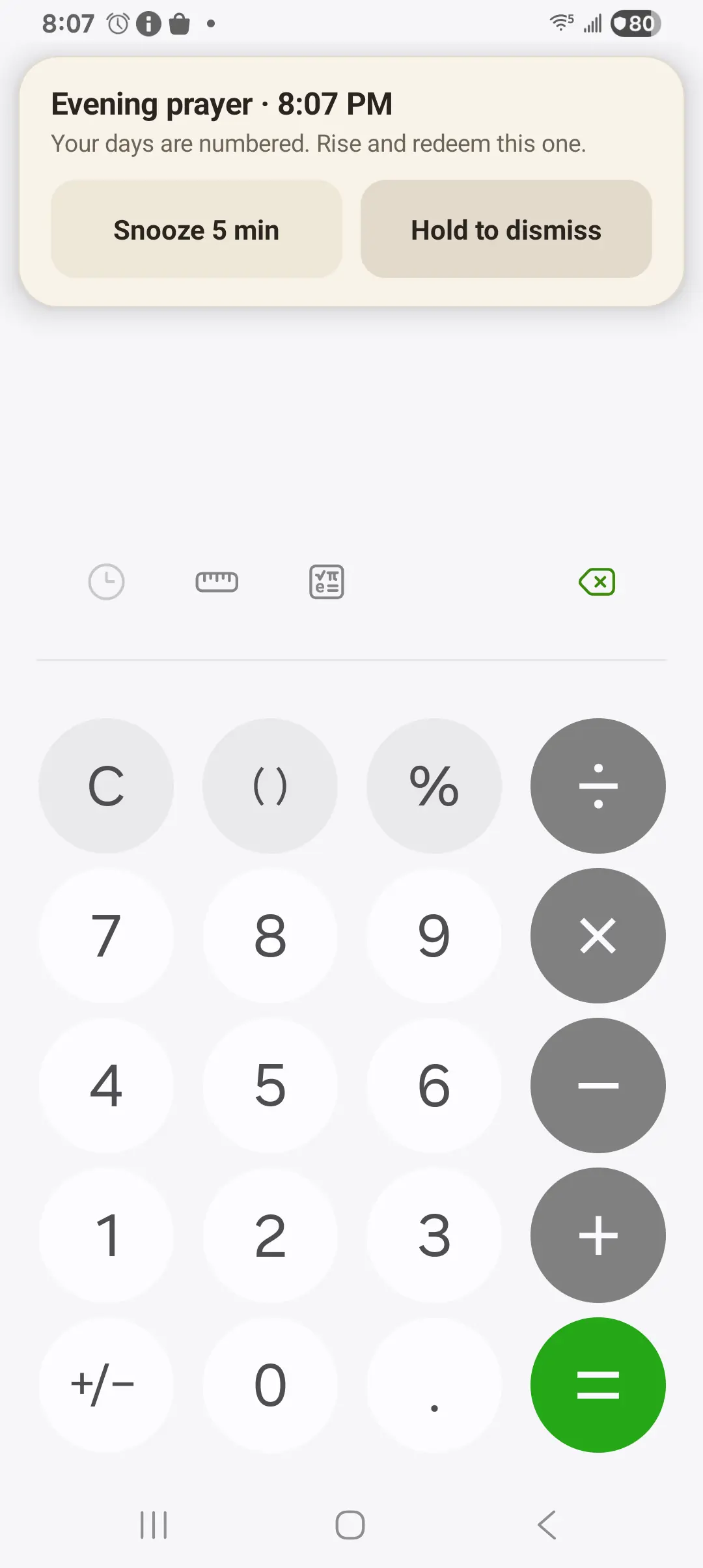
If the alarm rings while you are using another app, it drops down over it with Snooze and Dismiss and stays until you answer.
On Android, Do Not Disturb comes on and the apps you choose rest until the focus ends.
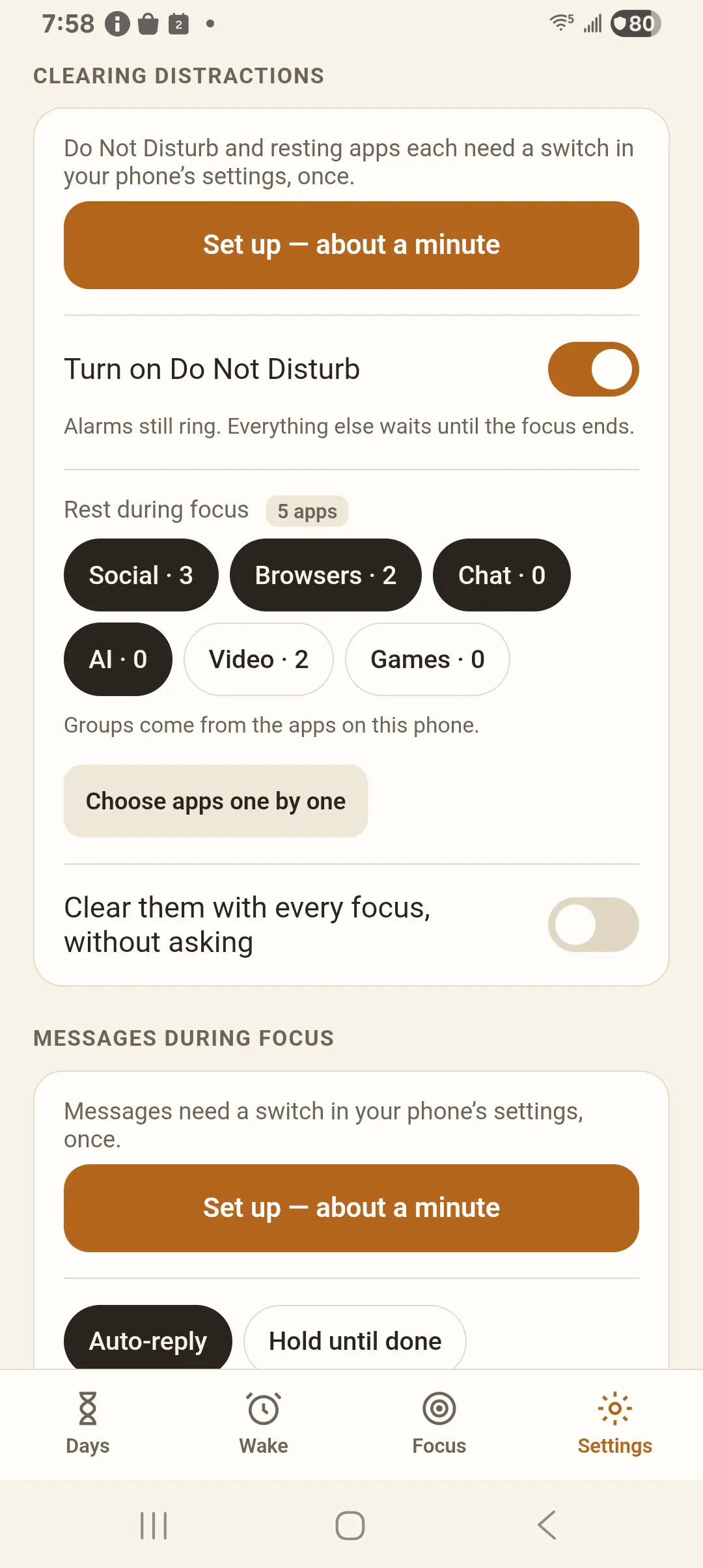
On Android, texts and chats get one reply with when you're free and two words that ring through.
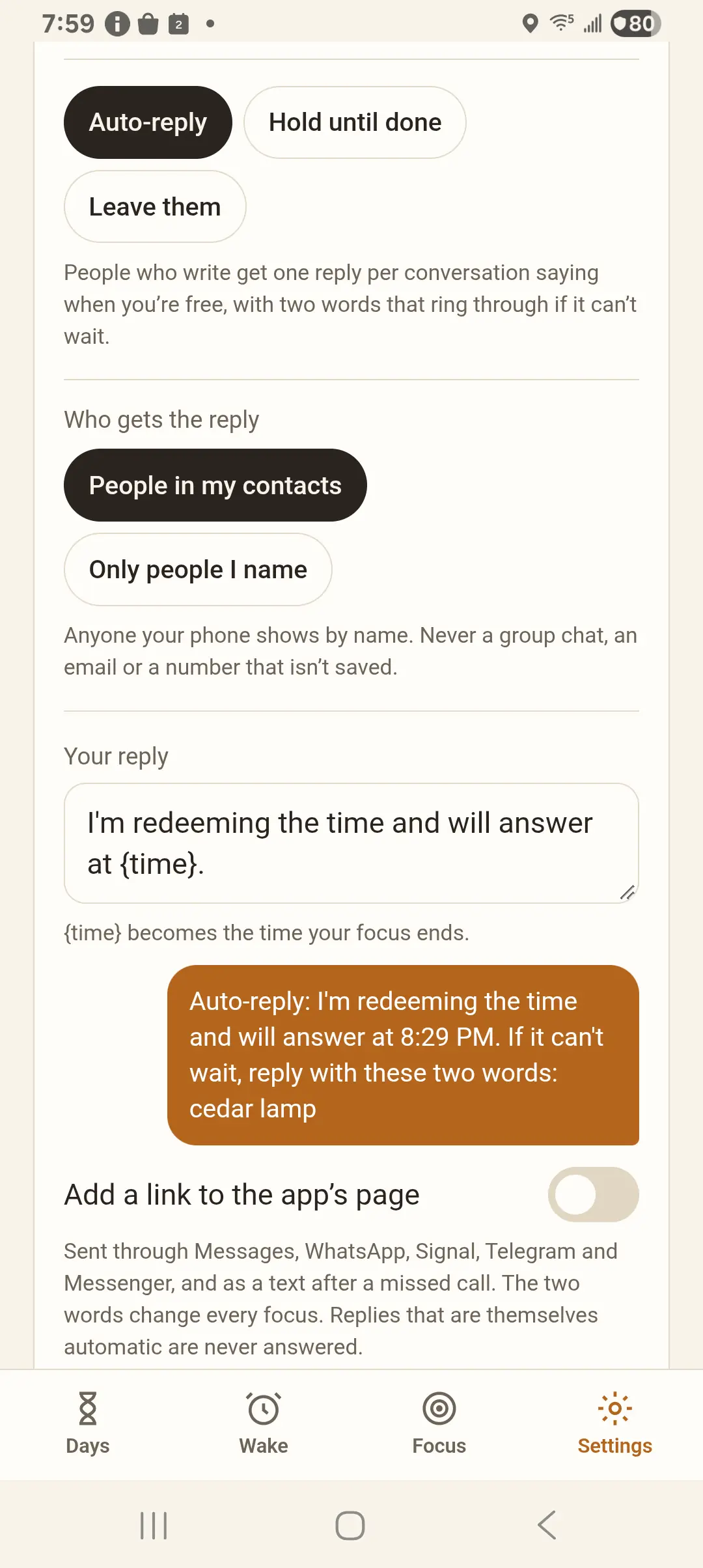
Captured on a Galaxy A14 with a fictional example profile, from the version 0.2.0 development build: the full Days screen, an evening alarm ringing and dropping down over the Calculator, and the Focus settings. Downloads are not open yet.
Wake
Set the time, repeat days, and snooze choices that fit your morning. On Android the alarm opens a screen with your day count, a verse and the way you chose to dismiss it: a tap, a three-second hold, or typing the verse reference. If you are using the phone when it rings, it drops down over the app you are in and stays until you snooze or dismiss it. The current iPhone app uses local notifications and opens to your day count with Snooze and “I’m up.”
Focus
Tap a length and the timer starts. On Android, Focus also clears the way: Do Not Disturb comes on, and the apps you choose rest until the time is up. Open one and Redeem the Time covers it with how long is left.
Messages are handled for you. Auto-reply answers texts and chats in Messages, WhatsApp, Signal, Telegram and Messenger, and texts back after a missed call: one reply per person, saying when you'll be free, with two words that ring through if it can't wait. Or choose Hold, and nothing comes through until you're done. Email, group chats and numbers you haven't saved are never answered; they wait, and at the end you see who wrote.
On iPhone, Focus is the timer. App resting and message handling are available on Android only.
A simple offer
Your lifetime-range view is always free. Try Wake and Focus free for 30 days, then unlock them for $3.99.
The demo ends without erasing your saved information. Your lifetime-range view remains available. You choose whether to buy the unlock; the demo does not automatically charge you.
On Android, the direct download from this site unlocks with a $3.99 purchase through Lemon Squeezy, and the Google Play version with a $3.99 in-app purchase through Google Play. On iPhone, the unlock is a $3.99 in-app purchase through the App Store. See the company license and purchase information.
30-day demo
Days is always free. Wake and Focus work for 30 days from the first opening, then unlock for $3.99.
Loading downloads…
APK for phones and tablets
Also on Google Play.
Pay once. Licensed for this major version, up to 5 devices. No account needed. The demo does not charge you.
Already bought? Open the app, then Settings, License, and paste your key.
Free download. Days is always free; the Wake and Focus unlock is a $3.99 in-app purchase.
A few useful details
No. It is an estimate based on population life tables, your age, and the profile choices you supply. It is not a medical assessment or a prediction of the length of your life. “Lifetime range” names this display; it does not describe license coverage.
Alarms and notifications use the phone's alarm and notification controls. Allowing the app to display over other apps lets a ringing alarm drop down over the app you are using. Clearing distractions is optional: Do Not Disturb needs its own permission, app resting uses an accessibility service, and message handling needs notification access. You choose which features to enable and can revoke permissions in Android Settings.
Automatic replies depend on a supported messaging app exposing a reply action. Choose your rules and approve reply text before enabling them. Do not rely on these features as an emergency communication service.
The current implementation uses notification-based alarms and a focus timer. Silent mode, Focus settings, and notification permissions affect alarm delivery. It does not include app blocking, message auto-replies, or an emergency bypass.
On Android, yes. Limits is in the 30-day demo and the $3.99 unlock, with Wake and Focus:
For iPhone, see "What is different on iPhone?"
The Days calculation and app settings are kept on your phone. Optional message features process notifications on Android; replies go through the messaging app you use. Support reports are sent only when you choose to send them. Purchases and demo verification have separate online requirements. Read the Redeem the Time privacy notice.
Life-table data: United Nations, Department of Economic and Social Affairs, Population Division (2024), World Population Prospects 2024, Online Edition, used under CC BY 3.0 IGO. The app bundles selected remaining-life-expectancy values for 2026–2035, ages 0–100+, and calculates the display on your phone.
Scripture: Berean Standard Bible and King James Version, with the selected translation identified in the app. Berean Bible information. Full source and third-party notices remain in About.
Made by Niche-Knack — Smart Tools. Sharp Solutions.
Questions or a problem? support@nk.tools · Privacy